



Web hosting is a important step to create website for a business, blogger, freelancer, or online store. A website also needs a place where its files, images, databases, and other resources can be stored. This service is known as web hosting. Choosing the right hosting service can affect website speed, security, uptime, scalability, and the overall experience of visitors. For beginners, hosting can seem complicated because providers offer different plans, technologies, and features. Understanding the basics can help website owners make better decisions and avoid unnecessary expenses. Here are 10 important things every website owner should know about web hosting.
Table of Contents
1. Web Hosting Stores Your Website Files
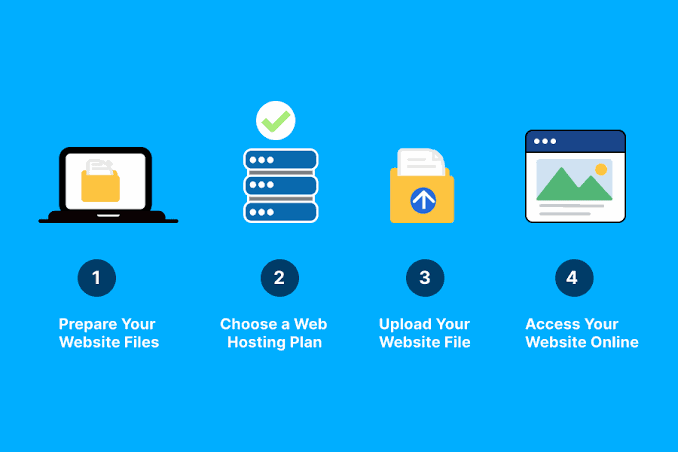
Web hosting provides storage space on a server for the files required to operate your website. These files may include HTML pages, CSS files, JavaScript, images, videos, databases, and application files. The server then sends the required information back to the visitor’s device. Just as a physical store needs a location where customers can visit, a website needs server space where its content can be stored and accessed. Without hosting, a typical website cannot remain continuously available to internet users.
2. Domain Names and Hosting are Different
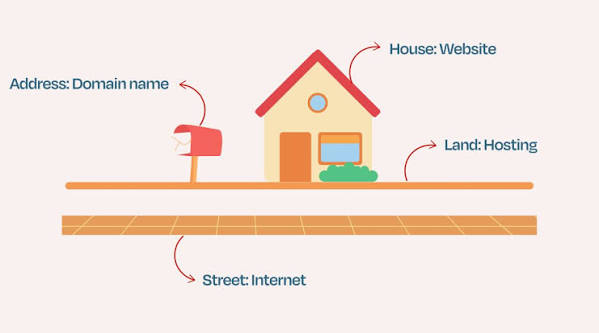
Many beginners assume that a domain name and web hosting are the same thing. They are actually two separate services. Web hosting is the server space where the website’s content is stored. For example, imagine a physical business.
A website usually needs both:
- Domain name: Helps visitors find the website.
- Web hosting: Stores the website’s files and makes them available online.
- DNS: Connects the domain name with the appropriate server.
3. There are Different Types of Web Hosting
Not every website requires the same type of hosting. Hosting companies generally offer several options designed for different website sizes and requirements.
Shared Hosting
It is generally affordable and can be suitable for personal blogs, portfolios, and small websites.
VPS Hosting
Although several virtual servers may operate on the same physical machine, each environment receives allocated resources. VPS hosting can be useful for growing websites that need more control and resources than basic shared hosting provides.
Dedicated Hosting
This provides greater control and access to substantial resources, although it usually costs more.
Cloud Hosting
Cloud hosting uses resources across a network of connected servers. It can offer flexibility and scalability, making it useful for websites whose traffic changes significantly.
The best option depends on website traffic, technical requirements, budget, and expected growth.
4. Website Speed Depends Partly on Hosting

Website performance matters because visitors generally expect pages to load quickly. A slow website can create frustration and may cause visitors to leave before interacting with the content.
Hosting can influence website performance through factors such as:
- Server hardware
- Available CPU and memory
- Storage technology
- Network capacity
- Server location
- Resource allocation
- Hosting configuration
Large images, unnecessary plugins, inefficient code, excessive scripts, and poorly optimised databases can also slow down a website. A good hosting plan combined with website optimisation can create a smoother browsing experience.
5. Uptime Is an Important Hosting Feature
Uptime refers to the amount of time a website remains available to visitors. If a hosting server frequently becomes unavailable, visitors may encounter errors instead of your website. For businesses and online stores, repeated downtime can potentially result in missed inquiries, sales, or customer interactions. Hosting companies often advertise uptime commitments, but website owners should look beyond a percentage shown on a pricing page.
It is useful to understand what the provider’s uptime policy actually covers and whether compensation or service guarantees apply. Website owners can also use monitoring tools to check whether their websites remain accessible. For a professional website, reliable hosting should be considered an important requirement rather than an optional feature.
6. Security Should Be a Hosting Priority

Website security is another important consideration when selecting a hosting service. A website can contain valuable information and may become a target for automated attacks.
Depending on the hosting provider and plan, security features may include:
- SSL/TLS certificates
- Firewall protection
- Malware scanning
- DDoS protection
- Secure server configurations
- Account isolation
- Automated security updates
- Backup systems
However, hosting security does not eliminate the website owner’s responsibilities. Website owners should use strong passwords, enable multi-factor authentication when available, keep software updated, remove unused plugins or themes, and maintain independent backups when appropriate. Security should be treated as an ongoing process rather than a one-time setup.
7. Storage and Bandwidth Have Different Meanings
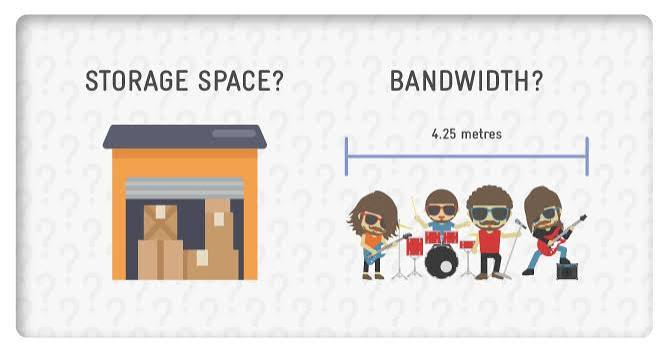
Storage and bandwidth are two terms commonly found in hosting plans, but they describe different things. Storage refers to the amount of space available for your website’s files and data. A website containing many high-resolution images, videos, downloads, or databases may require more storage. Bandwidth refers broadly to the amount of data that can be transferred between the website and its visitors over a period. For example, if many visitors download large files from your website, the website may consume considerably more bandwidth than a simple text-based blog. Before selecting a hosting plan, estimate your website’s current requirements and consider how those requirements may change as the site grows.
8. Backups Can Protect Your Website Data
Website problems can happen for many reasons. An incorrect configuration, software failure, accidental deletion, security incident, or failed update can potentially affect website data. Backups provide a way to restore information from an earlier point.
Some hosting providers include automated backups in their plans, while others offer them as an additional service. Website owners should check:
- How frequently backups are created
- How long backups are retained
- Whether databases are included
- Where backups are stored
- How restoration works
- Whether restoring a backup costs extra
It is also wise to avoid relying exclusively on a single backup location. Maintaining an independent copy can provide an additional layer of protection.
9. Customer Support Can Save Time
Technical problems do not always occur during convenient working hours. A website might suddenly become unavailable, a database could encounter an error, or a configuration change might cause unexpected behavior.
For this reason, customer support can be an important part of a hosting service.
Providers may offer support through:
- Live chat
- Email or support tickets
- Phone
- Knowledge bases
- Documentation
- Community forums
Before purchasing a plan, check what type of support is included and whether technical assistance is available around the clock. Good documentation is also valuable because it allows website owners to solve common problems without waiting for support.
10. Your Hosting Plan Should Support Future Growth
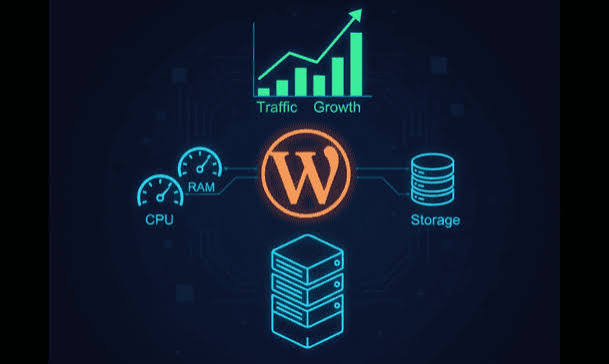
A hosting plan that works perfectly for a small website today may not be suitable after the website becomes popular. As traffic increases, a website may require additional storage, memory, processing power, database capacity, or bandwidth. A good hosting provider should make it reasonably straightforward to upgrade resources when necessary.
For example, a small blog might begin with shared hosting. As traffic increases, the owner could eventually consider VPS or cloud hosting. Before selecting a provider, look at the available upgrade options. Moving between hosting environments can require technical work, so planning ahead can reduce future difficulties.
How to Choose the Right Web Hosting
Choosing hosting should begin with understanding your website’s actual requirements rather than simply selecting the cheapest plan.
Consider these questions:
What type of website are you creating?
A portfolio may require fewer resources than an online store or large content platform.
How much traffic do you expect?
A website receiving hundreds of visitors may have very different requirements from one receiving thousands or millions.
Do you need special software?
Some applications require particular versions of programming languages, databases, or server technologies.
What security features are included?
Check whether SSL, backups, monitoring, malware protection, and other security features are provided.
Can you upgrade later?
Choose a provider that can accommodate growth instead of forcing you to migrate immediately when your website becomes larger.
How much technical control do you need?
Beginners may prefer managed services, while experienced developers may want greater server-level control.
Common Web Hosting Mistakes to Avoid
New website owners can sometimes focus only on the price of a hosting plan. A cheaper plan is not necessarily the best choice if it lacks important features.
Avoid these common mistakes:
- Choosing a plan without checking resource limits
- Ignoring backup policies
- Selecting a provider without researching support options
- Forgetting about website security
- Not checking renewal prices
- Buying more resources than the website actually needs
- Ignoring upgrade options
- Choosing hosting without checking compatibility requirements
Reading the terms and features carefully before purchasing can prevent many unpleasant surprises.
Conclusion
Web hosting is one of the basic building blocks of a website. It provides the server environment required to store website content and make it accessible to internet users.
Understanding hosting types, performance, uptime, security, storage, bandwidth, backups, customer support, and scalability can help website owners make more informed choices.
The cheapest hosting plan may be sufficient for a small personal website, while a growing business or high-traffic platform may need a more powerful solution. The right choice depends on your website’s current needs, technical requirements, budget, and future plans. By understanding these 10 important aspects of web hosting, beginners can approach hosting decisions with greater confidence and build a stronger foundation for their online presence.
FAQs
1.What is web hosting?
Web hosting is a service that provides server space for storing website files, databases, images, and other content so that people can access the website online.
2. What is the difference between a domain and web hosting?
A domain is the web address visitors use to find a website, while web hosting provides the server space where the website’s files are stored.
3. Which type of web hosting is best for beginners?
Shared hosting is often suitable for beginners because it is generally affordable and easier to manage. However, the best choice depends on the website’s requirements.
4. How does web hosting affect website speed?
Server resources, storage technology, network performance, and resource allocation can influence website speed. Website optimization also plays an important role.
5. Why is uptime important in web hosting?
Uptime indicates how consistently a website remains accessible. Reliable uptime helps visitors access the website without frequent service interruptions.
6. What is the difference between storage and bandwidth in hosting?
Storage is the space available for website files and data. Bandwidth relates to the amount of data transferred between the website and its visitors.
7. Does web hosting provide website security?
Many hosting providers offer security features such as SSL/TLS, firewalls, malware scanning, and backups. Website owners should also follow security best practices.
8. Why are website backups important?
Backups provide copies of website data that can potentially be restored after accidental deletion, software problems, configuration errors, or other incidents.
9. Can I upgrade my web hosting plan later?
Yes, many hosting providers allow customers to upgrade as their website grows. Before purchasing, check which upgrade options and resources are available.
10. How do I choose the right web hosting service?
Consider your website type, expected traffic, storage and resource requirements, security features, uptime, customer support, pricing, and future scalability before choosing a hosting service.
Leave a Reply