



If you’ve compared hosting plans recently, you’ve probably noticed cPanel software mentioned as a headline feature almost everywhere. It shows up on shared hosting pages, VPS listings, and even reseller plans, often positioned as a major selling point rather than a minor add-on. Before you commit to a hosting plan, it’s worth understanding exactly what this software does, how it’s priced, what alternatives exist, and which providers genuinely include it without hidden costs. This guide covers everything a beginner needs to know.
Table of Contents
What Is cPanel Software?
cPanel software is a Linux-based web hosting control panel designed to simplify website management through a visual, point-and-click dashboard. Rather than requiring users to type server commands manually, cPanel software translates complex backend tasks — creating email accounts, managing files, setting up databases — into simple menus and buttons that even complete beginners can navigate confidently.

This software has become the industry standard largely because of how much technical complexity it removes from everyday website management. Before tools like cPanel software existed, running a website required direct command-line access, effectively locking out anyone without a development or systems administration background. Today, cPanel software puts that same level of control within reach of small business owners, bloggers, and first-time website builders alike.
How it Actually Works
When your hosting provider includes cPanel software as part of your plan, you’re typically given a separate login specifically for this dashboard, distinct from your main hosting account portal. Logging in gives you access to a personalized control center where you manage everything related to your specific hosting account, while your provider continues handling the underlying server infrastructure behind the scenes.
In practice, this means cPanel software acts as the bridge between you and your server. Instead of contacting hosting support every time you need to create an email address, upload a file, or set up a database, cPanel software lets you handle these tasks yourself, instantly, through an intuitive graphical interface.
Core Features Included in this Software
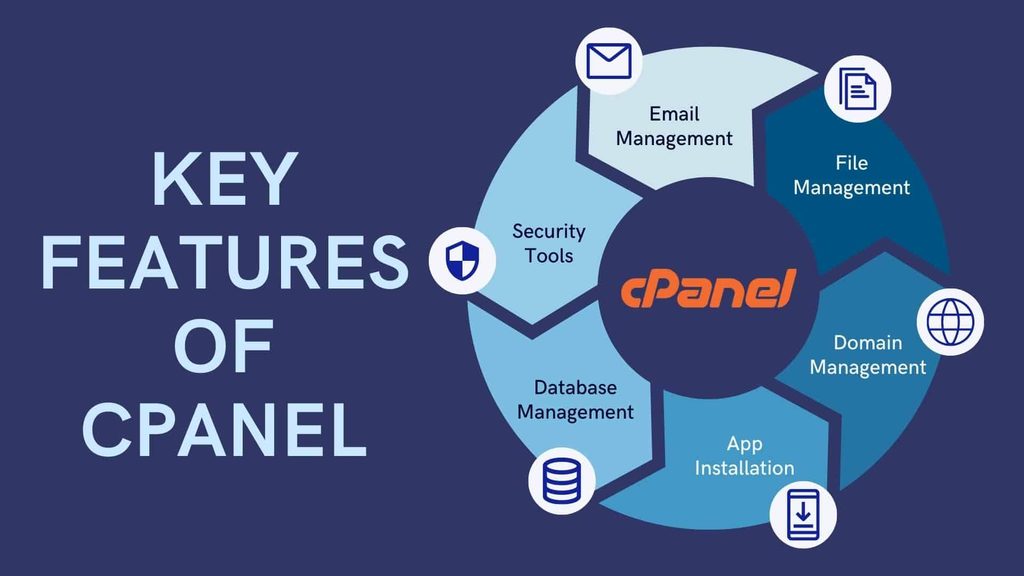
While cPanel software includes dozens of tools, a handful of core features cover the vast majority of what most users actually need:
- File Manager — Upload, edit, and organize website files directly through your browser.
- Email Account Manager — Create professional email addresses tied to your own domain.
- Database Management — Set up and maintain MySQL databases, which platforms like WordPress rely on to store content.
- Domain Management — Add domains, subdomains, and redirects to your hosting account.
- Backup Tools — Create manual backups or restore previous versions of your website.
- Softaculous App Installer — A one-click installer bundled with most cPanel software plans, enabling instant WordPress and CMS installations.
- Security Settings — Manage SSL certificates and configure basic account-level protections.
Is This Software Available for Windows?
A common point of confusion for beginners researching cPanel software is whether it works on Windows-based hosting environments. The short answer is no — cPanel software is built specifically for Linux servers and isn’t natively compatible with Windows hosting infrastructure.
If your hosting provider runs Windows-based servers, you’ll typically be offered Plesk instead, which serves a similar function to cPanel software but is compatible with both Linux and Windows environments. This distinction matters most if you’re running a website built on Windows-specific technologies, like ASP.NET, since those setups generally require Windows hosting and, by extension, a different control panel entirely.
Understanding cPanel Billing and Licensing Costs
cPanel billing works differently than many beginners initially assume. This software was never distributed as free, open-source technology — hosting companies pay a licensing fee, typically calculated per server or per account, in order to legally offer it to their customers. When a hosting plan advertises cPanel software as “included,” that licensing cost has simply been folded into your overall hosting price, rather than removed entirely.
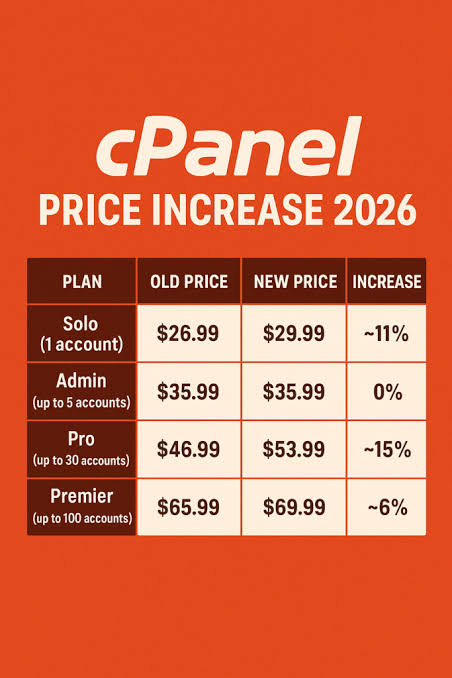
This is an important distinction to understand, particularly when comparing plans that seem unusually cheap. A hosting provider offering rock-bottom pricing without cPanel software isn’t necessarily a worse deal — they may simply be passing on savings by excluding a control panel license altogether, especially on VPS or dedicated server plans where cPanel billing is frequently handled as a separate monthly add-on rather than bundled by default.
Where to Find the Best cPanel Free Hosting Plans
Despite licensing costs existing behind the scenes, plenty of hosting providers advertise what’s commonly called cPanel free hosting, where the license fee is absorbed into your plan rather than billed as a separate charge. HostGator is frequently cited as one of the most consistent options here, bundling cPanel software into its Shared, Dedicated, and Reseller hosting plans, with entry-level pricing advertised as low as a few dollars per month during an introductory period.
Bluehost similarly bundles cPanel software into most of its shared hosting tiers, often paired with a free domain, SSL certificate, and CDN access. Hostinger has also gained attention for including a cPanel software license on select VPS plans alongside high-performance NVMe SSD storage. Smaller providers like InterServer and Truehost round out the field, both marketing straightforward, no-separate-license-fee hosting aimed specifically at budget-conscious beginners.
When comparing any cPanel free hosting offer, it’s worth checking renewal pricing carefully, since promotional introductory rates often increase significantly once the first billing term ends.
Popular Alternatives to This Software
While cPanel software remains the dominant choice across the hosting industry, it isn’t the only option available, and understanding the alternative of cPanel worth considering can help you make a more informed decision. Plesk is the most direct competitor, offering similar functionality while supporting both Linux and Windows servers. DirectAdmin is a lighter-weight, often more affordable alternative popular among budget hosting providers. CyberPanel has grown in popularity for its free, open-source model and built-in support for the OpenLiteSpeed web server. HestiaCP and CloudPanel round out the list of increasingly popular alternatives, both aimed at more technically confident users looking for leaner, more customizable control panel software.
cPanel Software vs. Its Competitors: A Quick Comparison
Choosing between cPanel software and its alternatives generally comes down to a tradeoff between familiarity and cost. cPanel software’s biggest advantage is its sheer ubiquity — because so many hosting providers and tutorials are built around it, beginners tend to find far more community support, documentation, and troubleshooting guides than they would with lesser-known control panels.
On the other hand, alternatives like DirectAdmin and CyberPanel often come with lower licensing costs, which can translate into cheaper hosting plans overall. For technically confident users comfortable navigating a less mainstream interface, these alternatives can offer meaningful savings without sacrificing much core functionality.
Choosing the Right cPanel Software Plan for Your Needs
Not every cPanel software plan is structured identically, so a few factors are worth confirming before you commit to a provider. First, verify whether the license is genuinely bundled into your plan or billed as a separate cost, particularly on VPS and dedicated hosting tiers.
Second, compare what else is included alongside cPanel software itself — free SSL, a complimentary domain, and CDN access all add real value beyond the control panel. Third, pay attention to renewal pricing rather than just the introductory rate, since many providers advertise attractively low first-term costs that increase substantially afterward.
Common Mistakes Beginners Make With This Software
A handful of avoidable mistakes tend to trip up first-time users of cPanel software. Skipping the initial security setup — like enabling two-factor authentication — is one of the most common, leaving accounts more exposed than necessary. Failing to configure regular backups is another frequent oversight, since backup tools within cPanel software often require manual setup rather than running automatically by default. Installing multiple one-click applications without maintaining them afterward can also accumulate outdated, unpatched software over time, quietly increasing security risk.
Conclusion
Understanding how this software works, how cPanel billing is actually structured, and which providers genuinely bundle it into their plans puts you in a far stronger position when comparing hosting options. Whether you choose a provider offering cPanel free hosting or decide an alternative of cPanel better suits your technical comfort level and budget, taking the time to understand these fundamentals ensures you’re making an informed choice rather than simply picking whichever plan looks cheapest at first glance.
FAQs
1. Is this software free to use?
Not entirely. Hosting providers pay a licensing fee for cPanel software, and when it’s advertised as included or free, that cost has simply been built into your overall hosting price rather than removed.
2. Does the software work on Windows hosting?
No. This software is designed exclusively for Linux servers. Windows-based hosting plans typically offer Plesk instead, which supports both operating systems.
3. What is the best alternative of cPanel for budget hosting?
DirectAdmin and CyberPanel are commonly recommended alternatives, both offering lower licensing costs compared to cPanel software while still covering most essential hosting management features.
4. Which providers offer the best cPanel free hosting plans?
HostGator, Bluehost, Hostinger, InterServer, and Truehost are frequently cited for bundling cPanel software into their plans without charging a separate license fee, particularly on shared hosting tiers.
5. How does cPanel billing typically work on VPS plans?
On many VPS hosting plans, cPanel billing is handled separately from the base hosting cost, often as an additional monthly fee, unlike shared hosting where it’s usually bundled in automatically.
Leave a Reply